Category: Volume 4 • 2020

Distinct Transcriptomic Reprogramming in the Wheat Stripe Rust Fungus During the Initial Infection of Wheat and Barberry

ISMPMI 285 2 1955560 removebg preview

Issue 1

2020

interactions

Did You Know

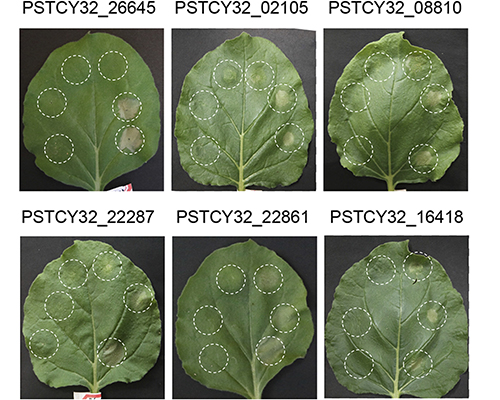
Puccinia striiformis f. sp. tritici is the causal agent of wheat stripe rust that causes severe yield losses all over the world. Zhao et al. represent the first analysis of the P. striiformis f. sp. tritici transcriptome in barberry and contribute to a better understanding of the evolutionary processes and strategies of different types of rust spores during the infection process on different hosts.​

images large mpmi 08 20 0244 rf6

Helpful Tips for Making Presentations Accessible, from Your Disabled Colleagues

ISMPMI 285 2 1955560 removebg preview

Issue 2

2021

interactions

Did You Know

Breanne Kisselstein, Chelsea Newbold, and Sarah Boggess
01Kisselstein photo
Breanne Kisselstein (She/Her/Hers)
Ph.D. Candidate Plant Pathology, Cornell University
DeafBlind, Invisible Chronic Illness, and Guide Dog User

In a world where new committees and positions are constantly being formed in our universities and scientific organizations around the principles of diversity, equity, and inclusion, it’s important to remember that disabled people also belong to this spectrum of diverse people. We know that 30% of full-time employees working in white-collar professions in the United States have a disability, but only 3.2% disclose their disabilities to their employer (Source: Center for Talent and Innovation’s “Disabilities and Inclusion” report, 2016). This means that many of our colleagues are disabled or have chronic illnesses that we likely do not know about. As we already know, diverse experiences allow us to have different perspectives and come up with novel solutions to the world’s problems. Isn’t that why we became scientists in the first place?

So now that we all agree that we need to do better to make sure our colleagues can participate fully in science, let’s talk about how we can do better! While there is a plethora of ways we can make every part of our scientific communities more equitable, let’s focus specifically on how to give presentations that are more accessible to people who live with color blindness, hearing or visual impairments, neurodiversity, autism, or dyslexia. Here’s a checklist to get you started with the basics:

01Newbold photo
Chelsea Newbold (They/Them/Theirs)
M.S. Plant Pathology, Oregon State University
Low Vision and Anxiety
    • Use a high-contrast color scheme like black text on a white background or vice versa.

    • Avoid using large amounts of text and make sure the text remaining is large enough, i.e. 14-point font on handouts and written documents and 24-point font on posters and slideshow presentations.

    • When making graphs and figures avoid using color combinations like red and green, green and brown, green and blue, blue and gray, blue and purple, green and gray, or green and black. (Here is a useful link that shows variations on color schemes that make them more accessible.) Also, use text and object colors that clearly contrast with the background. Black text and arrows on a white or pale grey background (or vice versa) mig

      ht seem “dull,” but it is easy for most people to read.

      01Boggess photo (1)
      Sarah Boggess (She/Her/Hers)
      Research Coor​dinator, University of Tennessee
      Spinal Muscular Atrophy and Power Wheelchair User​
    • Perform an “accessibility check” on your documents in recent versions of Microsoft Office and Adobe in the Tools menu under Check Accessibility or Accessibility.

  • Use accessible slide designs. Click here to download free templates and learn about how to create accessible graphs, reports, presentations, social media posts, and more.

Poster Presentations

Poster presentations are often a key point of information sharing at both national and regional meetings, and it is the critical conversations and dialogue that emerge from these presentations that drives our questions forward. To best serve all attendees, we recommend the following guidelines for creating a more accessible poster:

    • ​Make sure your line and character spacing is not too small. Use between 1.2 and 2.0 line-spacing to allow the reader greater ease in moving from line to line. If your processor allows for letter-spacing adjustments +3 is adequate.

    • Consider creating an audio recording of the text and description of the visual materials on your poster and provide a QR code or a link on your poster to the audio recording. Pro tip: Generating this audio recording will also have you fully prepared for when people stop by your poster at in-person meetings!

    • If you are presenting your poster in person, face the people you are speaking to and avoid covering your mouth so they can see your lips. Avoid chewing gum or eating when you are talking. If you must wear a mask that covers your mouth be sure to include alternative options, such as a QR code and voice recordings.

    • If an American Sign Language (ASL) interpreter is present, speak directly to the person who is deaf or hard-of-hearing. Also, if an interpreter voices for a deaf person who signs, look at the person signing rather than the interpreter.

    • If you will be presenting a video description of your poster, include captioning (see tips for Online Presentations below).

  • It has been suggested in recent years that the Better Poster format (i.e., billboard poster format) is one way to communicate your poster’s main ideas more effectively and clearly to your audience, and it makes your poster more accessible to a diverse audience.

Note: Most people with a smartphone can open their phone’s camera and hover over the QR code on your poster to be brought to the link!

Additional Resource Links

    1. American Public Health Association – Accessible Poster Presentations

  1. CMD-IT – Presentation and Poster Accessibility

Oral Presentations

In-Person Presentations

Oral presentations are key ways of communicating our research to other scientists, whether they are given at department seminars, conference sessions, or other venues. They serve to not only present findings but engage members in the fascinating research happening within the scientific community. To help you craft an accessible oral presentation, we recommend the following guidelines:

    • Give your slides to disabled audience members, captionists, and interpreters ahead of the presentation.

    • Avoid slides with an excessive number of pictures, images, or screenshots. If you do use illustrations in your storytelling, be sure to verbally describe the images or figures that are shown on each slide during your presentation. For example, “This image of a broken padlock represents how plant defenses can be overcome by some pathogens.”

    • Avoid complex tables and graphs. Only include information needed to tell your story and be sure to describe the results in your presentation. For example, “The bar graph on the left shows that the growth of Pseudomonas in Arabidopsis was 10-fold lower following the treatment compared to the nontreated control.”

    • Use a minimum font size of 20 points for less important text but keep most text around 30 points. If you have a hard time fitting all of your text onto a slide, try to be more concise with your information or separate the information into multiple slides.

    • Use plain language. Speak loudly, clearly, and directly into the microphone at a moderate pace. Use active words and short sentences. Use language that reinforces the visual material on your slides.

    • Always use the microphone provided. In some cases, the amplification system is connected to an FM transmitter, and people with hearing aids rely on sound coming through that system. If your presentation includes sound, make sure the sound is also routed through the amplification system and that captions are accurate and displayed on any videos.

  • Repeat audience questions using the microphone so that all listeners can hear the question.

Online Presentations

Online presentations and on-demand content are likely to become more common as we phase back into in-person mee​tings following the COVID-19 pandemic. Crafting prerecorded and live online content presents unique opportunities to prepare accessible presentations. To help you craft an accessible online presentation, we recommend the following guidelines:

    • ​Follow the layout and content guidelines already described above.

    • Design your content to be interpreted by assistive technology. Use a templated slide format. For example, rather than adding text boxes to existing layouts, add new content placeholders to the slide master if possible.

    • Use automated or live captioning for your presentation. Share your slides or a list of key terms (i.e., species names, acronyms, measured response variables that you repeat often) with the captionists or captioning software beforehand and remember to speak slowly, clearly, and loudly enough that the captioning can be as accurate as possible. Zoom, Microsoft PowerPoint, and Google Meet all have automated captioning options that you should get in the habit of using for all meetings and presentations, even if nobody discloses a disability to you.

    • Use ASL interpreting when possible and share your slides and a list of key terms with the interpreter beforehand.

  • If the presentation will be posted online for asynchronous viewing, proofread and edit the captions and transcript. Make sure that when they are posted, captions are available and working. (This takes the burden off disabled people who will assume that captions and transcripts aren’t available and, therefore, will be unable to access the material or be forced to look for a contact person to ask if these are available.)

Additional Resource Links

    1. VENNGAGE – How to Create Accessible Designs

    1. DLF – Delivering Presentations and Facilitating Discussion

    1. EuroPlanet Science Conference – Oral Presentation Guidelines

  1. Do-It – Equal Access: Universal Design of Your Presentation

Social Media

Social media has become a great way to help disseminate our scientific research and discover new collaborations. We present here a few suggestions to help you share your research through social media so it is accessible to all people:

Twitter

    • ​Insert alt text before posting (it cannot be done retroactively on this site).

    • When you see images or gifs, reply to other posts with “@ImageAltText,” and the bot will reply with the alt text that was inserted by the original poster. If it says no alt text, then kindly ask the original post creator to delete and repost the image with alt text. This is especially important if the image is about a job posting or displays a flyer for an upcoming talk that includes a registration or video conferencing link.

  • Follow @AltTxtReminder to receive reminders when you post something without alt text, so you can quickly delete and repost with alt text.

Instagram/Facebook

    • Proactively and retroactively add alt text to all posts.

    • Include image descriptions in your captions or a pinned comment.

    • If you see valuable content from another creator that does not have an image description in the caption or pinned comments, kindly ask the creator to do so.

  • If sharing a short video, add a transcript of any speech, either directly to the video captured or in the description.

Others

  • If releasing a YouTube video or podcast episode, please provide captions and a downloadable transcript along with every podcast episode. You can use a transcription software, such as Otter AI, Temi, Trint, or others, to generate a transcript, edit any mistakes, and share them with your deaf, hard-of-hearing, English as a second language learners, and every other member of your audience.

Additional Resource Links

    1. AbilityNet – How to Do Accessible Social Media

    1. Twitter – How to Make Images Accessible for People

  1. OtterAI – Generate Live Transcripts

Acknowledgments

We would like to thank Dennis Halterman for generating the idea to write this much needed article, for seeking out and valuing all of our knowledge, experiences, and input, and for giving us insights and edits to polish and publish this information. Secondly, we would like to thank The American Phytopathological Society (APS) Committee for Diversity, Equity, and Inclusion (DEI). This committee is co-chaired by Breanne Kisselstein and Krystel Navarro and vice chaired by Mariama Carter and Chelsea Newbold. The accessibility subcommittee is led by Chelsea Newbold and brought these three authors together to share this information with you. Please feel free to contact Breanne Kisselstein in order to contact the authors or receive more information on how to make scientific conferences, presentations, and STEM as a whole more accessible for people with disabilities and chronic illnesses, as well as people from multiple marginalized backgrounds.

Email a link

Summarizing Your Research in Just a Few Minutes

ISMPMI 285 2 1955560 removebg preview

Issue 2

2021

interactions

Did You Know

Dennis Halterman, EIC IS-MPMI Interactions

01Halterman photo

With help from Carlyn S. Buckler, Ph.D., Associate Professor of Practice, Cornell University; Christine Smart, Ph.D., Professor, Cornell University; Hilary Bonta and Eve Nora Litt, Applied Linguists, language connectED

At this year’s IS-MPMI eSymposia poster presenters are strongly encouraged to include a short video to accompany their poster. Although everyone has become familiar with virtual interactions over the past year, many of us have not practiced summarizing our research in a short 3–5 minutes format. However, having a prepared summary that is concise and effective can be extremely useful—not only in virtual settings, but also during in-person interactions (when things get back to normal). I have compiled some tips that I hope will help you as you prepare research summaries to accompany your posters at this year’s eSymposia.

Here’s a general talk outline that you might find helpful:

    1. ​Intro, your name, who you are – Approximately 10 seconds.

      2. What’s the hook? Why should someone listen to you and be interested in your research? – Approximately 20–30 seconds.

      3. How will this help the person you are talking to, or what are the main points you want to make? Don’t get bogged down in details—focus on the major findings and why they are important. – Approximately 1–2 minutes.

      4. Summarize the impact of your work. Why is it important, and how will it guide future research? – Approximately 20–30 seconds.

      5. Wrap-up, provide contact info, and ask if the person would like you to contact them, and/or let them know they can contact you. – Approximately 10 seconds.

Some helpful tips for developing your summary:​
Your poster will be available for everyone during the meeting on their own time. Therefore, it is not necessary to describe every experiment and result in detail—let the poster do that for you. Instead, take this opportunity to focus on the bigger picture of “why” you are doing these experiments and what impact they might have. Spend a bit more time highlighting the main research findings.

Know Your Audience

01Halterman graphic

You may have created multiple talks depending on their purpose. It is a good idea to know who you are talking with and what they already know before you start. You don’t want to get halfway through your talk and realize that your audience has no idea what bacteria are, or that plants can get sick from them. Alternatively, you don’t want to spend a lot of time introducing plant-pathogen interactions to someone who just published a review paper in MPMI. While you can sometimes make changes “on the spot,” it is always a good idea to have a well-rehearsed talk ready to go for most situations. For poster summaries at an IS-MPMI meeting, it is safe to assume that most people are familiar with molecular aspects of plant-microbe interactions.

Make It Personal

Do not just explain why this research is being done, tell them why YOU are doing this research. This will help people relate to what you are doing and help to feed into the story that you are telling. However, do not take this too far. You only have a couple minutes, and people do not need to hear your entire life story. It also helps to provide a “hook” right at the beginning (e.g., a mind-blowing statistic or surprising fact) that will help get your audience interested in listening to what you say.

Be Clear and Concise

You only have a few minutes to describe everything, so eliminate language that does not focus specifically on the story you are telling. If you find yourself struggling to keep your talk to around 3 minutes, think about what your audience needs to hear to remember your story. Your script (see below) will be helpful in highlighting essential language and removing the extra stuff.

Eliminate Jargon (Important for a General Audience)

You are familiar with many terms that we use like a second language in MPMI, such as hypersensitive response, effector, necrotroph, Arabidopsis, and Nicotiana, that even well-educated scientists may have a hard time understanding if they are not familiar with your area of research. Even relatively simple scientific terms, like nucleus, receptor, molecular, kinase, membrane, and expression, may not be appropriate to use when talking with someone who has not looked at a biology text book since secondary school. Avoid terms like these at all costs, unless you properly describe them to your audience. A good way to do this is to….

Use Analogies

Analogies can be used to help describe something complicated. It would be a great idea to have one or two “ready-to-go” analogies that you can use to help explain something. Try to come up with some common situations that might be similar to what you’re trying to describe. When talking about pathogenic interactions, your analogies may tend to be violent because, well, the interaction is actually quite violent. I like to use the analogy of a burglar (the pathogen) trying to break into your house (plant cell). The burglar has a toolbox (effectors) that help them break in and steal your stuff. To counter this, your house has walls (cell walls), locks, alarms (R proteins), or an auto-destruct system (HR) that help to defend against the burglar. (I don’t know of any houses with auto-destruct systems, but you get the idea.)

Keep in mind that some analogies might not be understood by everyone. Similar to “jargon,” be mindful of your audience. Analogies that involve current events, religion, or regional culture, for example, may not be understood by everyone.

Be Aware of What Your Body Is Doing

Twirling your heair, scratching your nose, constantly shifting your weight, looking at the floor, or running in circles—all can be equally distracting when you are trying to keep someone’s attention. You want people to focus on what you are saying, not what you are doing​.

Write/Type a Script

It will be critical that you use proper grammar, pronunciation, and speech patterns when you give your talk. This is an important point for everyone, not just non-native English speakers, so don’t take this lightly. Think about what it is you are trying to say. What are some important vocabulary words that are needed to describe your research? Practice pronouncing them accurately. What syllables need to be stressed? If it helps, use your script to underline or highlight syllables with the most stress to help you pronounce them correctly.

Pauses…are…GOOD…. They can emphasize an important point and help you to slow down and think about what you are going to say next. In your script, work on “thought groups” and mark the text where you think pauses should go.

A well-rehearsed script will also help you avoid saying “um,” “ah,” “so…,” “you know,” “right?,” etc.

In addition, distributing a script along with your video is incredibly important for audience members with visual, auditory, or other impairments. If you can add subtitles to your video, it would also be very helpful.

Do Not Be Perfect

Perfect can be boring and can seem robotic. You want people to know that they are listening to a person. Your goal should be to give a successful talk, not a perfect one. You should definitely practice your talk—a lot. The more comfortable you are with your talk, the more genuine you will seem. You may feel the need to eventually memorize your talk word-for-word. This is okay, but sometimes it may be better to memorize certain keywords or themes, so that if you stumble or forget something (which is fine, by the way), it is easier to pick up where you left off.

Recording Your Video

Using your phone to record your talk will likely work just fine. Please make sure the recording is in landscape (longer horizontally than vertically). If you do not have your talk completely memorized, you can use a teleprompting app (like PromptSmart) to help with the recording (you may find something else that works too). The free (lite) version of PromptSmart does not allow you to read and record at the same time, but you can use two devices (one to read the script and another to record). You will likely not get it perfect on the first try. In recording some videos of my own, I probably started and stopped 50 times before recording one that I liked. You may want to ask a patient friend if they are willing to help you record your video.​

Email a link

IS-MPMI Board of Directors Approves Inclusion Statement

ISMPMI 285 2 1955560 removebg preview

Issue 1

2020

interactions

Did You Know

Diversity and inclusion are core values of the International Society of Molecular Plant-Microbe Interactions. We are committed to cultivating and supporting a diverse membership, with inclusion, openness, and respect. Diverse groups are demonstrated to be more productive and creative and better able to answer key questions. We encourage all interested people to explore plant–microbe interactions, independent of their age, disability, ethnicity, gender identity, immigration status, national origin, race, religion, sexual orientation, and socio-economic status.

As an international society, it is our priority to increase diversity and facilitate change. IS-MPMI has created a Committee for Diversity and Inclusion (CDI), who will foster an inclusive environment within our community.​

Taking MPMI Discoveries to the Field Part II Workshop Held

ISMPMI 285 2 1955560 removebg preview

Issue 1

2020

interactions

Did You Know

MPMI banner 650

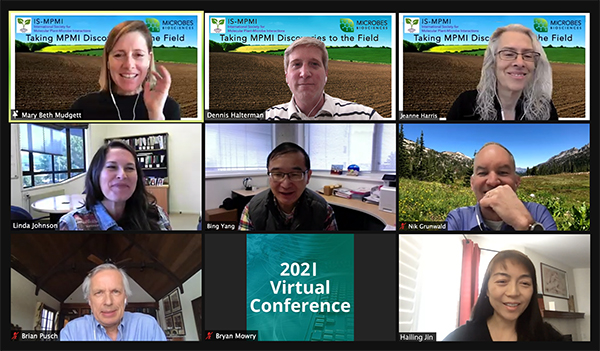
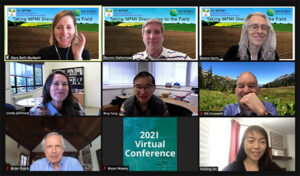
To draw our community together in a non-congress year, IS-MPMI gathered virtually on February 10 for the second of two workshops titled Taking MPMI Discoveries to the Field. These workshops highlighted the outstanding efforts of our members to translate molecular discoveries to the field and address MPMI Top 10 Question #3: How can we translate basic research into emerging crop plants? In the second workshop, Dr. Bing Yang, from the Danforth Plant Science Center and University of Missouri, spoke about his work using genome editing to increase resistance to bacterial blight in rice. Dr. Nik Grünwald, from the USDA-ARS and Oregon State University, discussed bioinformatic tools that his lab has developed to study the genomes of Phytophthora species. These useful tools will be made available to our community soon. Dr. Hailing Jin, from the University of California-Riverside, presented exciting new data on the role of small RNAs in both pathogen infection and host defense strategies. Dr. Linda Johnson, from AgResearch in New Zealand, talked about fungal endophytes and their role in plant health. The workshop was sponsored by Microbes Biosciences, and CEO Brian Pusch concluded the workshop by introducing attendees to the company and discussed the processes they use to identify beneficial microbes and incorporate them into products used in agriculture. The event was moderated by Mary Beth Mudgett (IS-MPMI president), Jeanne Harris (EIC, MPMI journal), and Dennis Halterman (EIC, IS-MPMI Interactions).

If you attended the event, or if you registered and were not able to attend, you can log into the IS-MPMI website and watch a recording of the workshop. If you haven’t already, you can still register for the event and view the recording of the talks and discussions.​

IS-MPMI to Host 2021 IS-MPMI Congress: eSymposia Series

ISMPMI 285 2 1955560 removebg preview

Issue 1

2020

interactions

Did You Know

06Congress eSeries (1)

IS-MPMI is excited to announce the 2021 Congress: eSymposia Series, which will take place online with a series of three separate events starting this summer! Abstract submissions open later in March. Stay tuned​ for more details​ about this opportunity to share your research and network with colleagues at this virtual scientific event.

Take the IS-MPMI Congress Series Survey

ISMPMI 285 2 1955560 removebg preview

Issue 1

2020

interactions

Did You Know

06Congress eSeries

We need your input to ensure our future online events and eSymposia are delivering what you need! Check your inbox for your link to the Congress Series survey. The survey will close Monday, March 22.

IS-MPMI Board of Directors Approves Inclusion Statement

ISMPMI 285 2 1955560 removebg preview

Issue 1

2021

interactions

Did You Know

Diversity and inclusion are core values of the International Society of Molecular Plant-Microbe Interactions. We are committed to cultivating and supporting a diverse membership, with inclusion, openness, and respect. Diverse groups are demonstrated to be more productive and creative and better able to answer key questions. We encourage all interested people to explore plant–microbe interactions, independent of their age, disability, ethnicity, gender identity, immigration status, national origin, race, religion, sexual orientation, and socio-economic status.

As an international society, it is our priority to increase diversity and facilitate change. IS-MPMI has created a Committee for Diversity and Inclusion (CDI), who will foster an inclusive environment within our community.​

Email a link

Taking MPMI Discoveries to the Field Part II Workshop Held

ISMPMI 285 2 1955560 removebg preview

Issue 1

2021

interactions

Did You Know

06Symposium Graphic

To draw our community together in a non-congress year, IS-MPMI gathered virtually on February 10 for the second of two workshops titled Taking MPMI Discoveries to the Field. These workshops highlighted the outstanding efforts of our members to translate molecular discoveries to the field and address MPMI Top 10 Question #3: How can we translate basic research into emerging crop plants? In the second workshop, Dr. Bing Yang, from the Danforth Plant Science Center and University of Missouri, spoke about his work using genome editing to increase resistance to bacterial blight in rice. Dr. Nik Grünwald, from the USDA-ARS and Oregon State University, discussed bioinformatic tools that his lab has developed to study the genomes of Phytophthora species. These useful tools will be made available to our community soon. Dr. Hailing Jin, from the University of California-Riverside, presented exciting new data on the role of small RNAs in both pathogen infection and host defense strategies. Dr. Linda Johnson, from AgResearch in New Zealand, talked about fungal endophytes and their role in plant health. The workshop was sponsored by Microbes Biosciences, and CEO Brian Pusch concluded the workshop by introducing attendees to the company and discussed the processes they use to identify beneficial microbes and incorporate them into products used in agriculture. The event was moderated by Mary Beth Mudgett (IS-MPMI president), Jeanne Harris (EIC, MPMI journal), and Dennis Halterman (EIC, IS-MPMI Interactions).

If you attended the event, or if you registered and were not able to attend, you can log into the IS-MPMI website and watch a recording of the workshop. If you haven’t already, you can still register for the event and view the recording of the talks and discussions.​

Email a link

IS-MPMI to Host 2021 IS-MPMI Congress: eSymposia Series

ISMPMI 285 2 1955560 removebg preview

Issue 1

2021

interactions

Did You Know

06Congress eSeries

IS-MPMI is excited to announce the 2021 Congress: eSymposia Series, which will take place online with a series of three separate events starting this summer! Abstract submissions open later in March. Stay tuned​ for more details​ about this opportunity to share your research and network with colleagues at this virtual scientific event.

Email a link

Scroll to Top